在本文中,我们将使用 Python 操作表格,向您展示创建表格以及在表格中操作数据的最简方法。借助我们的 API,您可以操作表格并将其导出为 Word、Excel、PDF 等多种格式。
我们将介绍 Aspose.Words for Python via .NET,并重点演示如何使用该 API 创建和插入表格。

Aspose.Words for Python via .NET
是一个类库,旨在读取和操作多种文档类型,如 Microsoft Word(DOCX、DOC、ODT)、Web(Markdown、HTML)、PDF 等。使用此 Python API,您可以创建、编辑、渲染并将 Word 文件转换为多种格式,生成报告并可视化数据,无需外部软件。
超过 100 个 Python 类可用于文档处理和数据格式化操作,随时为您提供支持。
在 Python 中使用表格
表格可以将大量信息组织为行列网格结构,在展示分栏数据时能够更好地控制内容布局。
表格是由行和列组成的结构化数据集合,我们的库完全支持表格,您可以轻松编辑、修改、添加和删除表格。
下面我们将演示如何使用 Python 创建新表格,并在文档中查看如何应用格式化
、使用 TableStyle
、操作列和行
、以及合并和拆分表格
。
在 Python 中创建表格
我们的库提供多种在文档中创建新表格的方法,本文将展示其中几种用法。
新创建的表格默认值与 Microsoft Word 的默认值相似。
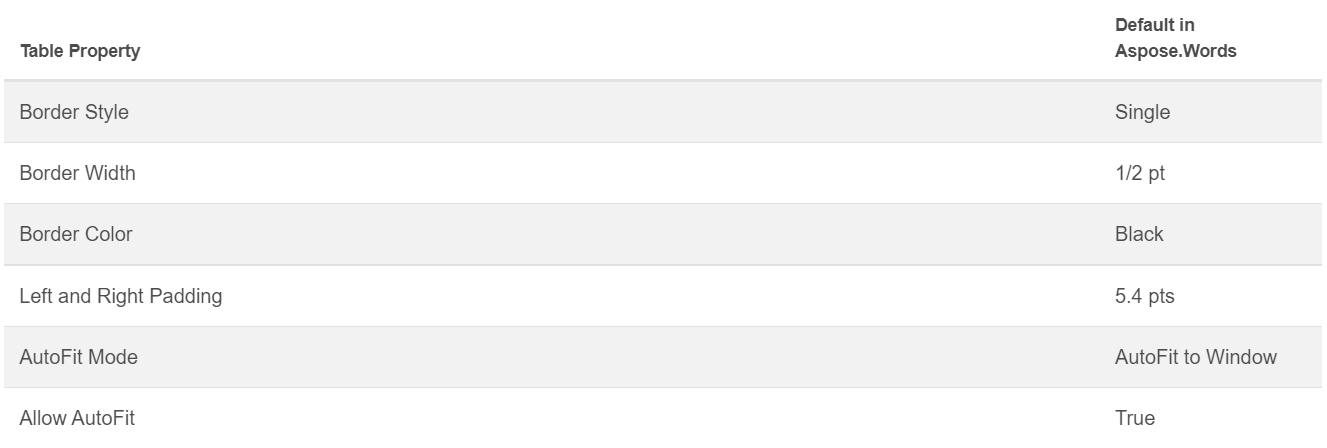
您可以使用 DocumentBuilder 类
并调用以下方法来构建表格:
• DocumentBuilder.start_table
• DocumentBuilder.insert_cell
• DocumentBuilder.end_row
• DocumentBuilder.end_table
• DocumentBuilder.writeln
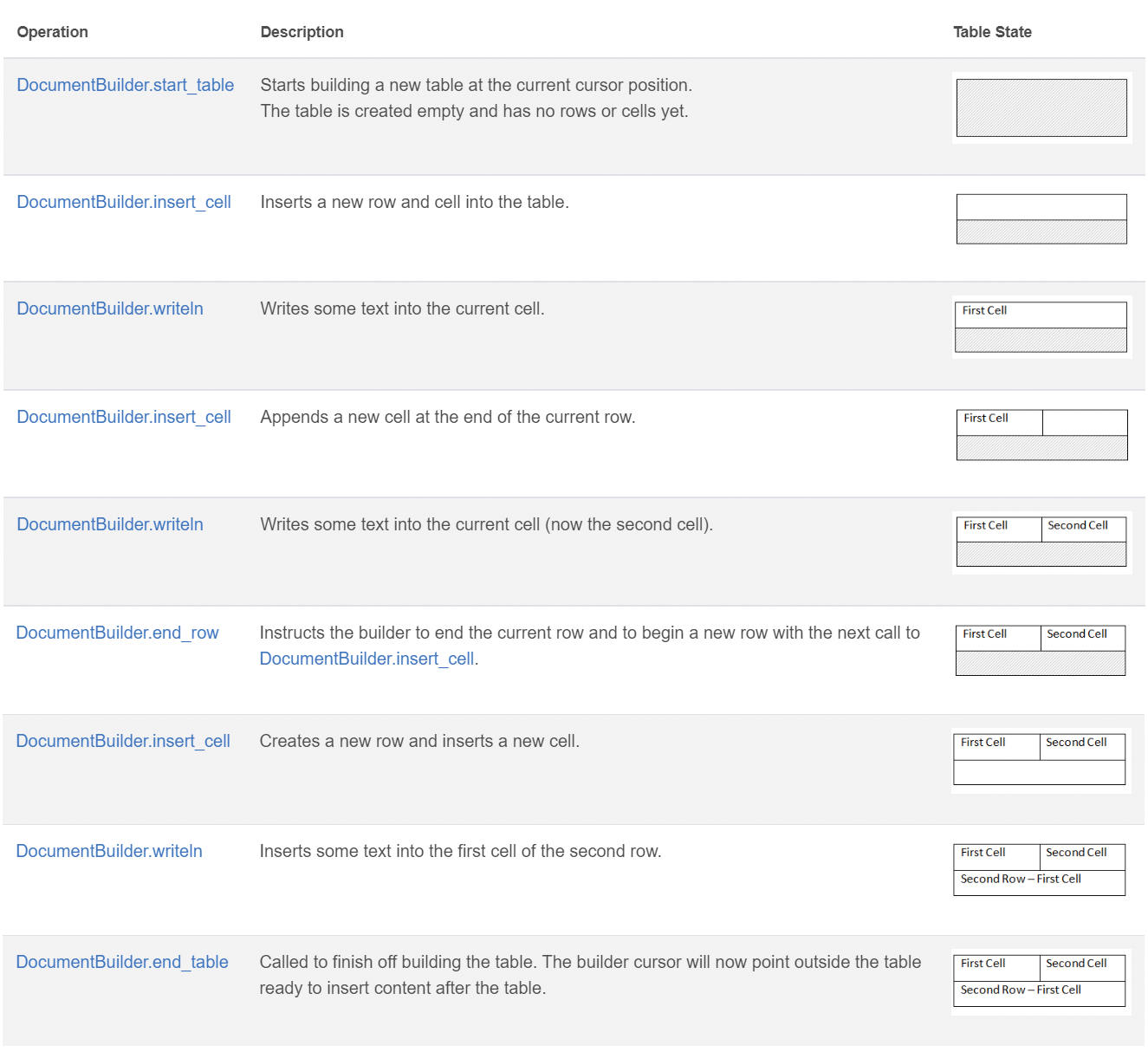
使用以下 7 步在 Python 中创建表格:
- 使用 DocumentBuilder.start_table 开始表格。
- 使用 DocumentBuilder.insert_cell 在表格中插入单元格,并使用 DocumentBuilder.cell_format 指定单元格格式。
- 使用 DocumentBuilder 插入单元格内容。
- 重复步骤 2 和 3,直至完成整行。
- 调用 DocumentBuilder.end_row 方法结束当前行,并使用 DocumentBuilder.row_format 进行行格式设置。
- 重复步骤 2‑5,直至完成整个表格。
- 使用 DocumentBuilder.end_table 方法结束表格。
有关 DocumentBuilder 类及其表格创建方法的更多细节,请参阅我们的文档
。
下面的示例演示如何使用 DocumentBuilder 创建一个带默认格式的简单表格。
# For complete examples and data files, please go to https://github.com/aspose-words/Aspose.Words-for-Python-via-.NET
doc = aw.Document()
builder = aw.DocumentBuilder(doc)

# Start building the table.
builder.start_table()
builder.insert_cell()
builder.write("Row 1, Cell 1 Content.")

# Build the second cell.
builder.insert_cell()
builder.write("Row 1, Cell 2 Content.")

# Call the following method to end the row and start a new row.
builder.end_row()

# Build the first cell of the second row.
builder.insert_cell()
builder.write("Row 2, Cell 1 Content")

# Build the second cell.
builder.insert_cell()
builder.write("Row 2, Cell 2 Content.")
builder.end_row()

# Signal that we have finished building the table.
builder.end_table()

doc.save(docs_base.artifacts_dir + "WorkingWithTables.create_simple_table.docx")
使用 DocumentBuilder
创建格式化表格,代码示例如下。
# For complete examples and data files, please go to https://github.com/aspose-words/Aspose.Words-for-Python-via-.NET
doc = aw.Document()
builder = aw.DocumentBuilder(doc)

table = builder.start_table()
builder.insert_cell()

# Table wide formatting must be applied after at least one row is present in the table.
table.left_indent = 20.0

# Set height and define the height rule for the header row.
builder.row_format.height = 40.0
builder.row_format.height_rule = aw.HeightRule.AT_LEAST

builder.cell_format.shading.background_pattern_color = drawing.Color.from_argb(198, 217, 241)
builder.paragraph_format.alignment = aw.ParagraphAlignment.CENTER
builder.font.size = 16
builder.font.name = "Arial"
builder.font.bold = True

builder.cell_format.width = 100.0
builder.write("Header Row,\n Cell 1")

# We don't need to specify this cell's width because it's inherited from the previous cell.
builder.insert_cell()
builder.write("Header Row,\n Cell 2")

builder.insert_cell()
builder.cell_format.width = 200.0
builder.write("Header Row,\n Cell 3")
builder.end_row()

builder.cell_format.shading.background_pattern_color = drawing.Color.white
builder.cell_format.width = 100.0
builder.cell_format.vertical_alignment = aw.tables.CellVerticalAlignment.CENTER

# Reset height and define a different height rule for table body.
builder.row_format.height = 30.0
builder.row_format.height_rule = aw.HeightRule.AUTO
builder.insert_cell()

# Reset font formatting.
builder.font.size = 12
builder.font.bold = False

builder.write("Row 1, Cell 1 Content")
builder.insert_cell()
builder.write("Row 1, Cell 2 Content")

builder.insert_cell()
builder.cell_format.width = 200.0
builder.write("Row 1, Cell 3 Content")
builder.end_row()

builder.insert_cell()
builder.cell_format.width = 100.0
builder.write("Row 2, Cell 1 Content")

builder.insert_cell()
builder.write("Row 2, Cell 2 Content")

builder.insert_cell()
builder.cell_format.width = 200.0
builder.write("Row 2, Cell 3 Content.")
builder.end_row()
builder.end_table()

doc.save(docs_base.artifacts_dir + "WorkingWithTables.formatted_table.docx")
插入已有表格
如果文档中已经存在表格并希望复制一份进行修改,最简便的方式是使用 Table.clone
方法保留所有格式。
下面的示例展示了如何插入表格,如果需要此示例的模板文件,可从此处
下载。
# For complete examples and data files, please go to https://github.com/aspose-words/Aspose.Words-for-Python-via-.NET
doc = aw.Document(docs_base.my_dir + "Tables.docx")

table = doc.get_child(aw.NodeType.TABLE, 0, True).as_table()

# Clone the table and insert it into the document after the original.
tableClone = table.clone(True).as_table()
table.parent_node.insert_after(tableClone, table)

# Insert an empty paragraph between the two tables,
# or else they will be combined into one upon saving this has to do with document validation.
table.parent_node.insert_after(aw.Paragraph(doc), table)

doc.save(docs_base.artifacts_dir + "WorkingWithTables.clone_complete_table.docx")
如果您对表格、Aspose.Words for Python via .NET 产品有任何疑问,或需要我们的付费支持开发人员
帮助您在项目中实现 API,欢迎联系我们
。