ในบทความนี้เราจะทำงานกับตารางใน Python เราจะแสดงวิธีที่ง่ายที่สุดในการสร้างตารางและจัดการข้อมูลภายในตาราง โดยใช้ API ของเรา คุณสามารถจัดการตารางและส่งออกเป็นรูปแบบต่าง ๆ เช่น Word, Excel, PDF ฯลฯ
เราจะแนะนำ Aspose.Words for Python via .NET และเน้นการสร้างและแทรกตารางด้วย API นี้

Aspose.Words for Python via .NET
เป็นไลบรารีคลาสที่ออกแบบมาเพื่ออ่านและจัดการเอกสารหลายประเภท เช่น Microsoft Word (DOCX, DOC, ODT), เว็บ (Markdown, HTML), PDF และอื่น ๆ ด้วย API ของ Python นี้ คุณสามารถสร้าง, แก้ไข, เรนเดอร์, และแปลงไฟล์ Word ไปยังหลายรูปแบบ, สร้างรายงาน, และแสดงข้อมูลของคุณโดยไม่ต้องใช้ซอฟต์แวร์ภายนอก
มีคลาส Python มากกว่า 100 คลาสสำหรับการประมวลผลเอกสารและการจัดรูปแบบข้อมูลพร้อมให้คุณใช้งาน
การทำงานกับตารางใน Python
ตารางช่วยจัดระเบียบข้อมูลจำนวนมากและแสดงในรูปแบบกริดที่มีแถวและคอลัมน์ เป็นประโยชน์อย่างยิ่งเมื่อแสดงข้อมูลแบบตาราง เนื่องจากช่วยควบคุมการออกแบบเนื้อหาได้ดียิ่งขึ้น
ตารางคือชุดข้อมูลที่มีโครงสร้างประกอบด้วยแถวและคอลัมน์ รองรับเต็มรูปแบบในไลบรารีของเรา และคุณสามารถแก้ไข, เปลี่ยนแปลง, เพิ่มและลบตารางได้อย่างง่ายดาย
ด้านล่างเราจะแสดงวิธีสร้างตารางใหม่ด้วย Python และในเอกสารของเราคุณสามารถดูวิธีการ apply formatting
, work with TableStyle
, work with columns and rows
, และ join and split tables
การสร้างตารางใน Python
ไลบรารีของเรามีวิธีการต่าง ๆ สำหรับการสร้างตารางใหม่ในเอกสาร และในบทความนี้เราจะดูวิธีใช้บางส่วนของวิธีการเหล่านั้น
ตารางที่สร้างใหม่มีค่าเริ่มต้นคล้ายกับค่ามาตรฐานของ Microsoft Word
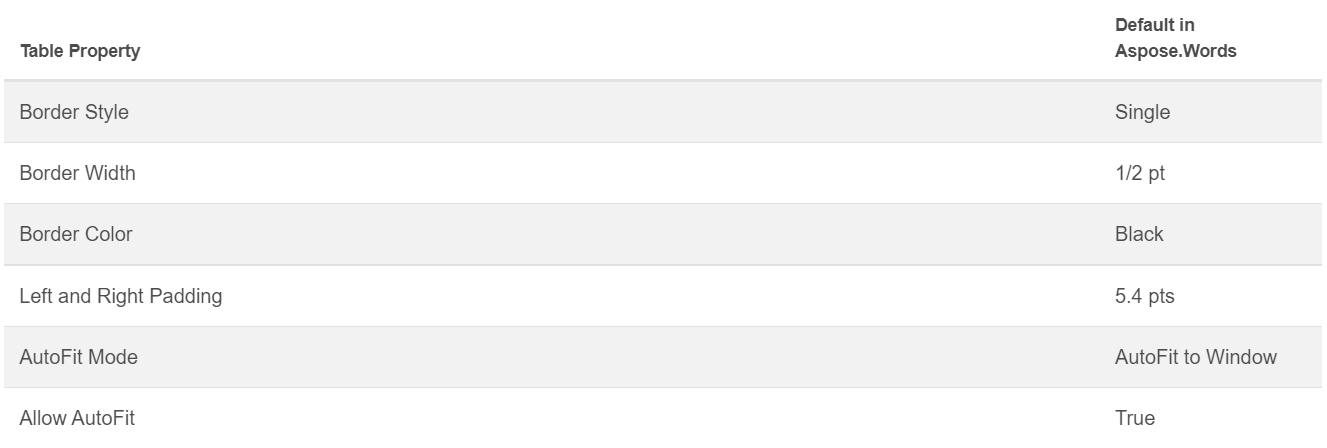
คุณสามารถแทรกตารางโดยใช้คลาส DocumentBuilder
พร้อมวิธีการต่อไปนี้เพื่อสร้างตาราง:
• DocumentBuilder.start_table
• DocumentBuilder.insert_cell
• DocumentBuilder.end_row
• DocumentBuilder.end_table
• DocumentBuilder.writeln
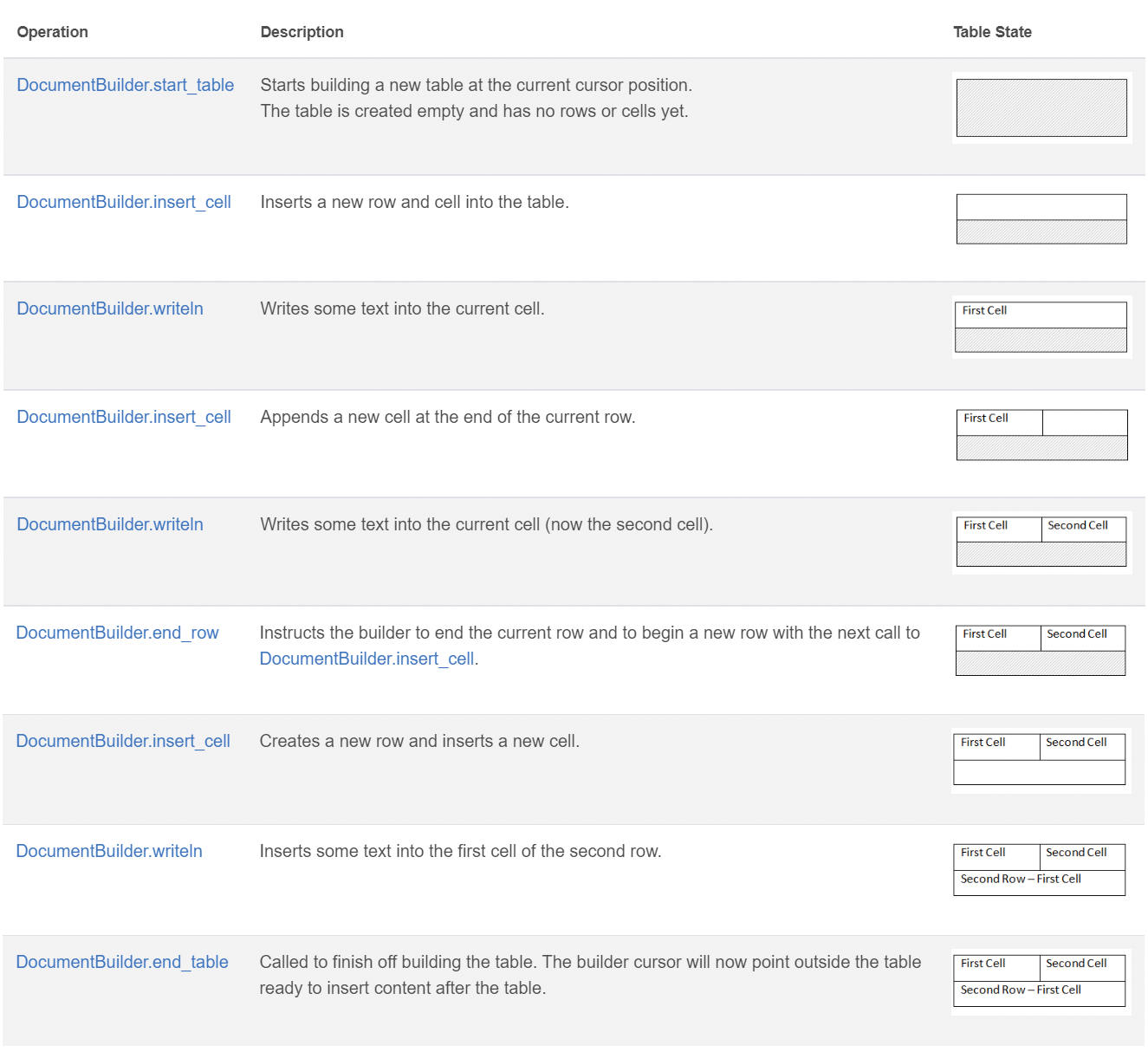
สร้างตารางใน Python ด้วย 7 ขั้นตอนนี้:
- เริ่มตารางด้วย
DocumentBuilder.start_table
- ใช้
DocumentBuilder.insert_cell เพื่อแทรกเซลล์ในตาราง และใช้ DocumentBuilder.cell_format เพื่อกำหนดรูปแบบเซลล์
- ใช้
DocumentBuilder เพื่อแทรกเนื้อหาในเซลล์
- ทำซ้ำขั้นตอนที่ 2 และ 3 จนกว่าจะครบแถว
- เรียกใช้เมธอด
DocumentBuilder.end_row เพื่อสิ้นสุดแถวและใช้ DocumentBuilder.row_format เพื่อกำหนดรูปแบบแถว
- ทำซ้ำขั้นตอนที่ 2‑5 จนกว่าจะครบตารางทั้งหมด
- ใช้เมธอด
DocumentBuilder.end_table เพื่อจบการสร้างตาราง
รายละเอียดเพิ่มเติมเกี่ยวกับคลาส DocumentBuilder และเมธอดสำหรับการสร้างตารางสามารถอ่านได้ใน documentation
ของเรา
ในตัวอย่างด้านล่างคุณจะเห็นวิธีสร้างตารางง่าย ๆ ด้วยรูปแบบเริ่มต้นโดยใช้ DocumentBuilder
# For complete examples and data files, please go to https://github.com/aspose-words/Aspose.Words-for-Python-via-.NET
doc = aw.Document()
builder = aw.DocumentBuilder(doc)

# Start building the table.
builder.start_table()
builder.insert_cell()
builder.write("Row 1, Cell 1 Content.")

# Build the second cell.
builder.insert_cell()
builder.write("Row 1, Cell 2 Content.")

# Call the following method to end the row and start a new row.
builder.end_row()

# Build the first cell of the second row.
builder.insert_cell()
builder.write("Row 2, Cell 1 Content")

# Build the second cell.
builder.insert_cell()
builder.write("Row 2, Cell 2 Content.")
builder.end_row()

# Signal that we have finished building the table.
builder.end_table()

doc.save(docs_base.artifacts_dir + "WorkingWithTables.create_simple_table.docx")
สร้างตารางที่มีรูปแบบโดยใช้ DocumentBuilder
ตามโค้ดตัวอย่างด้านล่าง
# For complete examples and data files, please go to https://github.com/aspose-words/Aspose.Words-for-Python-via-.NET
doc = aw.Document()
builder = aw.DocumentBuilder(doc)

table = builder.start_table()
builder.insert_cell()

# Table wide formatting must be applied after at least one row is present in the table.
table.left_indent = 20.0

# Set height and define the height rule for the header row.
builder.row_format.height = 40.0
builder.row_format.height_rule = aw.HeightRule.AT_LEAST

builder.cell_format.shading.background_pattern_color = drawing.Color.from_argb(198, 217, 241)
builder.paragraph_format.alignment = aw.ParagraphAlignment.CENTER
builder.font.size = 16
builder.font.name = "Arial"
builder.font.bold = True

builder.cell_format.width = 100.0
builder.write("Header Row,\n Cell 1")

# We don't need to specify this cell's width because it's inherited from the previous cell.
builder.insert_cell()
builder.write("Header Row,\n Cell 2")

builder.insert_cell()
builder.cell_format.width = 200.0
builder.write("Header Row,\n Cell 3")
builder.end_row()

builder.cell_format.shading.background_pattern_color = drawing.Color.white
builder.cell_format.width = 100.0
builder.cell_format.vertical_alignment = aw.tables.CellVerticalAlignment.CENTER

# Reset height and define a different height rule for table body.
builder.row_format.height = 30.0
builder.row_format.height_rule = aw.HeightRule.AUTO
builder.insert_cell()

# Reset font formatting.
builder.font.size = 12
builder.font.bold = False

builder.write("Row 1, Cell 1 Content")
builder.insert_cell()
builder.write("Row 1, Cell 2 Content")

builder.insert_cell()
builder.cell_format.width = 200.0
builder.write("Row 1, Cell 3 Content")
builder.end_row()

builder.insert_cell()
builder.cell_format.width = 100.0
builder.write("Row 2, Cell 1 Content")

builder.insert_cell()
builder.write("Row 2, Cell 2 Content")

builder.insert_cell()
builder.cell_format.width = 200.0
builder.write("Row 2, Cell 3 Content.")
builder.end_row()
builder.end_table()

doc.save(docs_base.artifacts_dir + "WorkingWithTables.formatted_table.docx")
การแทรกตารางที่มีอยู่แล้ว
หากคุณมีตารางอยู่ในเอกสารและต้องการเพิ่มสำเนาของตารางนี้เพื่อทำการแก้ไข วิธีที่ง่ายที่สุดในการทำสำเนาตารางคือการใช้เมธอด Table.clone
เพื่อคงรูปแบบทั้งหมด
ในตัวอย่างด้านล่างคุณจะเห็นวิธีแทรกตาราง และหากต้องการไฟล์เทมเพลตของตัวอย่างนี้ คุณสามารถดาวน์โหลดได้จาก here
# For complete examples and data files, please go to https://github.com/aspose-words/Aspose.Words-for-Python-via-.NET
doc = aw.Document(docs_base.my_dir + "Tables.docx")

table = doc.get_child(aw.NodeType.TABLE, 0, True).as_table()

# Clone the table and insert it into the document after the original.
tableClone = table.clone(True).as_table()
table.parent_node.insert_after(tableClone, table)

# Insert an empty paragraph between the two tables,
# or else they will be combined into one upon saving this has to do with document validation.
table.parent_node.insert_after(aw.Paragraph(doc), table)

doc.save(docs_base.artifacts_dir + "WorkingWithTables.clone_complete_table.docx")
หากคุณมีคำถามเกี่ยวกับตาราง, ผลิตภัณฑ์ Aspose.Words for Python via .NET หรือจำเป็นต้องการความช่วยเหลือจาก Paid Support developers
ในการนำ API ของเราไปใช้ในโครงการของคุณ โปรดอย่าลังเลที่จะ contact us
.