Sa alt seo oibreoimid le táblaí i Python, taispeánfaimid an bealach is éasca chun tábla a chruthú agus na sonraí laistigh den tábla a láimhseáil. Trí úsáid a bhaint as ár n‑API, is féidir leat táblaí a láimhseáil agus iad a easpórtáil go formáidí éagsúla, mar Word, Excel, PDF, srl.
Cuirfimid i láthair Aspose.Words for Python via .NET, agus díreoimid ar chruthú agus ionsá táblaí ag baint úsáide as an API seo.
Aspose.Words for Python via .NET
is a class library designed to read and manipulate documents of numerous types like Microsoft Word (DOCX, DOC, ODT), Web (Markdown, HTML), PDF, and others. With this Python API, you can create, edit, render, and convert Word files to multiple formats, generate reports, and visualize your data without the need for external software.
More than 100 Python classes for handling document processing and data formatting operations are at your disposal.
Ag obair le Táblaí i Python
Ligeann táblaí eolas mór a eagrú agus a thaispeáint i struchtúr greille le rótaí agus colúin. Tá siad an-úsáideach nuair a thaispeántar sonraí i gclár, toisc go soláthraíonn siad rialú i bhfad níos fearr ar dhearadh an ábhair.
Is tacair shtructúrtha de shonraí iad táblaí, comhdhéanta de rótaí agus colúin. Tá siad tacaíocht iomlán iár leabharlann, agus is féidir leat táblaí a chur in eagar, a athrú, a chur leis agus a bhaint go héasca.
Thíos, taispeánfaimid duit conas tábla nua a chruthú le Python, agus i dhoiciméadú ár leithéid, is féidir leat a fheiceáil conas formáidiú a chur i bhfeidhm
, obair le TableStyle
, obair le colúin agus rótaí
, agus táblaí a chomhdhéanamh agus a roinnt
.
Cruthú táblaí i Python
Tairgeann ár leabharlann modhanna éagsúla chun táblaí nua a chruthú laistigh de cháipéis, agus sa alt seo feicfimid conas roinnt de na modhanna seo a úsáid.
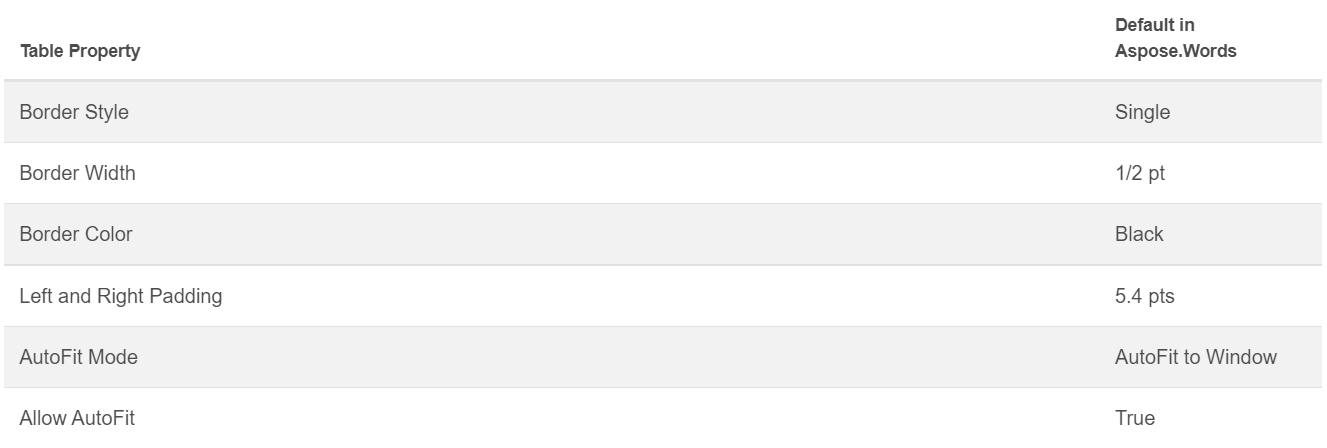
Tá na luachanna sa tábla nua cruthaithe cothrom le luachanna réamhshocraithe Microsoft Word.
Is féidir leat tábla a ionsá ag baint úsáide as an rang DocumentBuilder
, agus an modh seo a leanas chun an tábla a thógáil:
• DocumentBuilder.start_table
• DocumentBuilder.insert_cell
• DocumentBuilder.end_row
• DocumentBuilder.end_table
• DocumentBuilder.writeln
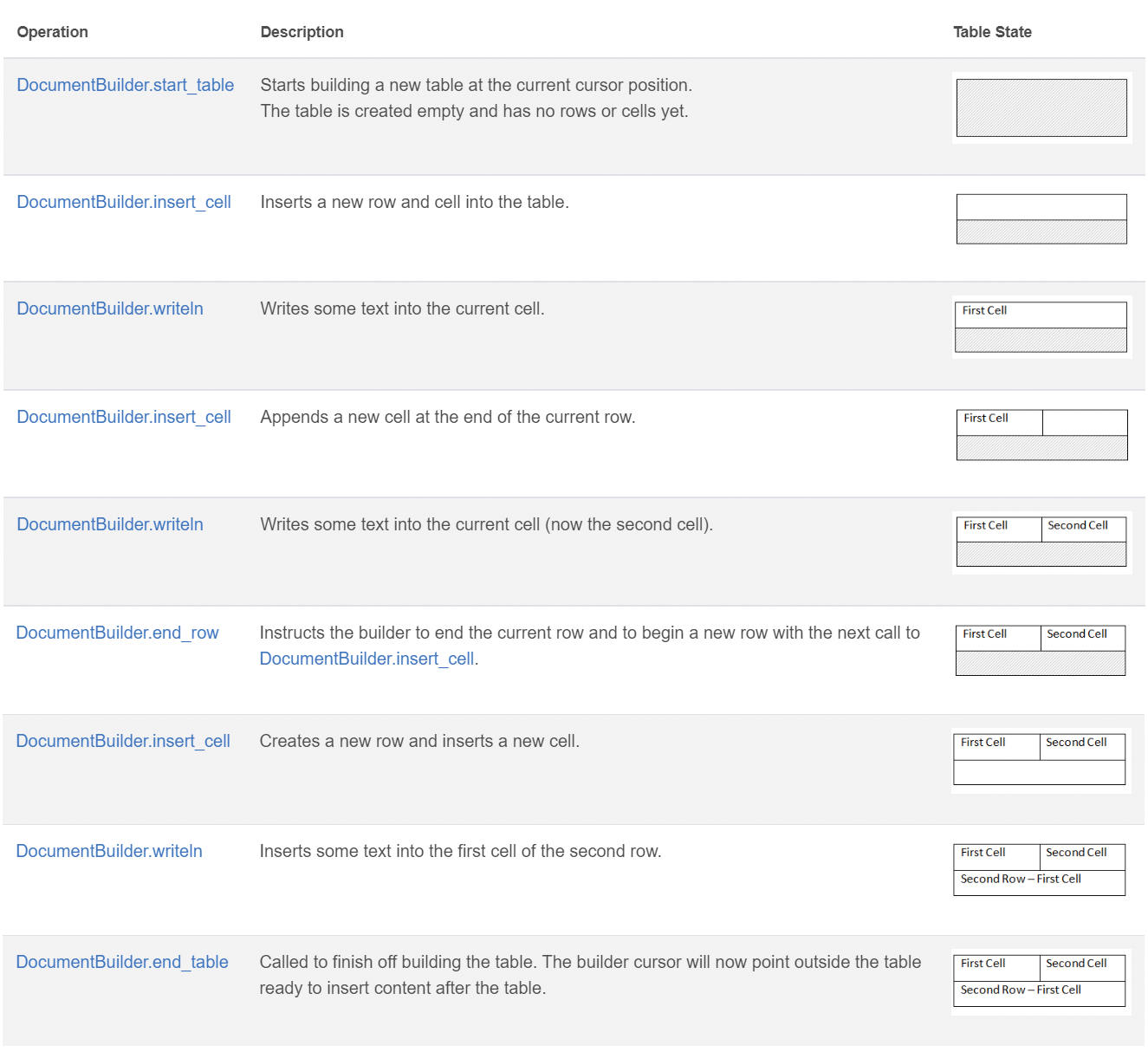
Cruthaigh tábla i Python ag baint úsáide as na 7 chéim seo:
- Tosaigh an tábla le
DocumentBuilder.start_table.
- Úsáid
DocumentBuilder.insert_cell chun cill a ionsá sa tábla, agus bain úsáid as DocumentBuilder.cell_format chun formáidiú na cille a shonrú.
- Úsáid an
DocumentBuilder chun ábhar na cille a chur isteach.
- Déan na céimeanna 2 agus 3 a athdhéanadh go dtí go gcríochnaíonn tú an ró.
- Is féidir leat an modh
DocumentBuilder.end_row a ghlaochadh chun an ró a chríochnú agus DocumentBuilder.row_format a úsáid chun formáidiú an ró a dhéanamh.
- Tar éis sin, déan na céimeanna 2 go 5 a athdhéanadh go dtí go gcríochnaíonn tú an tábla.
- Úsáid an modh
DocumentBuilder.end_table chun an tábla a chríochnú.
Tá tuilleadh sonraí faoi rang DocumentBuilder agus na modhanna le haghaidh cruthú táblaí curtha i láthair i d’doiciméadú
.
Sa shampla thíos, is féidir leat a fheiceáil conas tábla simplí a chruthú le formáidiú réamhshocraithe ag baint úsáide as DocumentBuilder.
# For complete examples and data files, please go to https://github.com/aspose-words/Aspose.Words-for-Python-via-.NET
doc = aw.Document()
builder = aw.DocumentBuilder(doc)

# Start building the table.
builder.start_table()
builder.insert_cell()
builder.write("Row 1, Cell 1 Content.")

# Build the second cell.
builder.insert_cell()
builder.write("Row 1, Cell 2 Content.")

# Call the following method to end the row and start a new row.
builder.end_row()

# Build the first cell of the second row.
builder.insert_cell()
builder.write("Row 2, Cell 1 Content")

# Build the second cell.
builder.insert_cell()
builder.write("Row 2, Cell 2 Content.")
builder.end_row()

# Signal that we have finished building the table.
builder.end_table()

doc.save(docs_base.artifacts_dir + "WorkingWithTables.create_simple_table.docx")
Cruthaigh tábla formáidithe ag baint úsáide as DocumentBuilder
leis an gcód thíos.
# For complete examples and data files, please go to https://github.com/aspose-words/Aspose.Words-for-Python-via-.NET
doc = aw.Document()
builder = aw.DocumentBuilder(doc)

table = builder.start_table()
builder.insert_cell()

# Table wide formatting must be applied after at least one row is present in the table.
table.left_indent = 20.0

# Set height and define the height rule for the header row.
builder.row_format.height = 40.0
builder.row_format.height_rule = aw.HeightRule.AT_LEAST

builder.cell_format.shading.background_pattern_color = drawing.Color.from_argb(198, 217, 241)
builder.paragraph_format.alignment = aw.ParagraphAlignment.CENTER
builder.font.size = 16
builder.font.name = "Arial"
builder.font.bold = True

builder.cell_format.width = 100.0
builder.write("Header Row,\n Cell 1")

# We don't need to specify this cell's width because it's inherited from the previous cell.
builder.insert_cell()
builder.write("Header Row,\n Cell 2")

builder.insert_cell()
builder.cell_format.width = 200.0
builder.write("Header Row,\n Cell 3")
builder.end_row()

builder.cell_format.shading.background_pattern_color = drawing.Color.white
builder.cell_format.width = 100.0
builder.cell_format.vertical_alignment = aw.tables.CellVerticalAlignment.CENTER

# Reset height and define a different height rule for table body.
builder.row_format.height = 30.0
builder.row_format.height_rule = aw.HeightRule.AUTO
builder.insert_cell()

# Reset font formatting.
builder.font.size = 12
builder.font.bold = False

builder.write("Row 1, Cell 1 Content")
builder.insert_cell()
builder.write("Row 1, Cell 2 Content")

builder.insert_cell()
builder.cell_format.width = 200.0
builder.write("Row 1, Cell 3 Content")
builder.end_row()

builder.insert_cell()
builder.cell_format.width = 100.0
builder.write("Row 2, Cell 1 Content")

builder.insert_cell()
builder.write("Row 2, Cell 2 Content")

builder.insert_cell()
builder.cell_format.width = 200.0
builder.write("Row 2, Cell 3 Content.")
builder.end_row()
builder.end_table()

doc.save(docs_base.artifacts_dir + "WorkingWithTables.formatted_table.docx")
Ionsá tábla atá ann cheana
Má tá tábla agat cheana i do cháipéis agus má theastaíonn leat cóip den tábla sin a chur leis chun athruithe a dhéanamh air, is é an bealach is éasca tábla a dhúblú ná an modh Table.clone
a úsáid chun an formáidiú go léir a choinneáil.
Sa shampla thíos, is féidir leat a fheiceáil conas tábla a ionsá, agus má theastaíonn an comhad teimpléad den shampla seo, is féidir leat í íoslódáil ó anseo
.
# For complete examples and data files, please go to https://github.com/aspose-words/Aspose.Words-for-Python-via-.NET
doc = aw.Document(docs_base.my_dir + "Tables.docx")

table = doc.get_child(aw.NodeType.TABLE, 0, True).as_table()

# Clone the table and insert it into the document after the original.
tableClone = table.clone(True).as_table()
table.parent_node.insert_after(tableClone, table)

# Insert an empty paragraph between the two tables,
# or else they will be combined into one upon saving this has to do with document validation.
table.parent_node.insert_after(aw.Paragraph(doc), table)

doc.save(docs_base.artifacts_dir + "WorkingWithTables.clone_complete_table.docx")
Má tá ceisteanna agat faoi tháblaí, faoi tháirgí Aspose.Words for Python via .NET agus más gá cabhair ó forbróirí Tacaíochta Íoctha
chun ár n‑API a chur i bhfeidhm i do thionscadal, ná bíodh drogall ort teagmháil a dhéanamh linn
.