इस लेख में हम Python में तालिकाओं के साथ काम करेंगे, और आपको तालिका बनाने और उसके भीतर डेटा को नियंत्रित करने का सबसे आसान तरीका दिखाएंगे। हमारे API का उपयोग करके आप तालिकाओं को संशोधित कर सकते हैं और उन्हें विभिन्न फ़ॉर्मेट्स, जैसे Word, Excel, PDF आदि में निर्यात कर सकते हैं।
हम Aspose.Words for Python via .NET का परिचय देंगे, और इस API का उपयोग करके तालिकाएँ बनाने और सम्मिलित करने पर ध्यान केंद्रित करेंगे।

Aspose.Words for Python via .NET
एक क्लास लाइब्रेरी है जो Microsoft Word (DOCX, DOC, ODT), वेब (Markdown, HTML), PDF और अन्य कई प्रकार के दस्तावेज़ों को पढ़ने और संशोधित करने के लिए डिज़ाइन की गई है। इस Python API के साथ आप Word फ़ाइलें बना, संपादित, रेंडर और कई फ़ॉर्मेट्स में परिवर्तित कर सकते हैं, रिपोर्ट जनरेट कर सकते हैं और अपने डेटा को बाहरी सॉफ़्टवेयर की आवश्यकता के बिना विज़ुअलाइज़ कर सकते हैं।
दस्तावेज़ प्रोसेसिंग और डेटा फ़ॉर्मेटिंग ऑपरेशनों को संभालने के लिए 100 से अधिक Python क्लासेज़ आपके उपयोग के लिए उपलब्ध हैं।
Python में तालिकाओं के साथ काम करना
तालिकाएँ बड़ी मात्रा में जानकारी को व्यवस्थित करने और उसे पंक्तियों व स्तंभों वाले ग्रिड‑समान संरचना में प्रदर्शित करने की अनुमति देती हैं। वे टैब्ड डेटा को दिखाने में बहुत उपयोगी होती हैं क्योंकि वे सामग्री के डिज़ाइन पर बेहतर नियंत्रण प्रदान करती हैं।
तालिकाएँ डेटा के संरचित सेट होते हैं जो पंक्तियों और स्तंभों से मिलकर बनते हैं। वे हमारी लाइब्रेरी में पूरी तरह समर्थित हैं, और आप आसानी से तालिकाओं को संपादित, बदल, जोड़ और हटाए सकते हैं।
नीचे हम आपको दिखाएंगे कि Python का उपयोग करके नई तालिका कैसे बनाते हैं, और हमारे दस्तावेज़ीकरण में आप देख सकते हैं कि कैसे फ़ॉर्मेटिंग लागू करें
, TableStyle के साथ काम करें
, कॉलम और पंक्तियों के साथ काम करें
, और टेबल को जोड़ें और विभाजित करें
।
Python में तालिकाएँ बनाना
हमारी लाइब्रेरी दस्तावेज़ के भीतर नई तालिकाएँ बनाने के लिए विभिन्न विधियाँ प्रदान करती है, और इस लेख में हम इन विधियों में से कुछ का उपयोग देखेंगे।
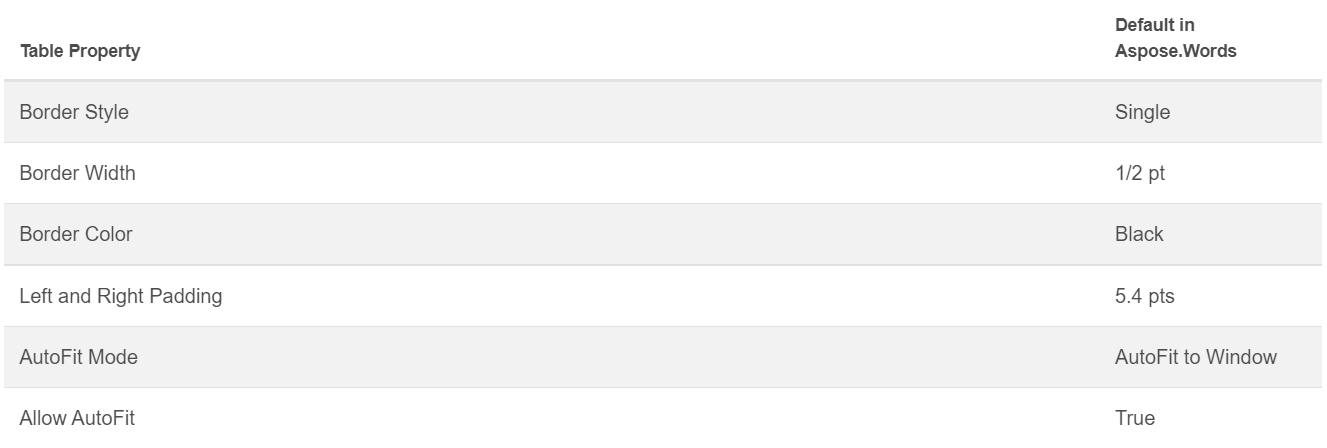
नव निर्मित तालिका के मान Microsoft Word के डिफ़ॉल्ट मानों के समान होते हैं।
आप DocumentBuilder class
का उपयोग करके तालिका सम्मिलित कर सकते हैं, और तालिका बनाने के लिए निम्नलिखित विधियों का उपयोग कर सकते हैं:
• DocumentBuilder.start_table
• DocumentBuilder.insert_cell
• DocumentBuilder.end_row
• DocumentBuilder.end_table
• DocumentBuilder.writeln
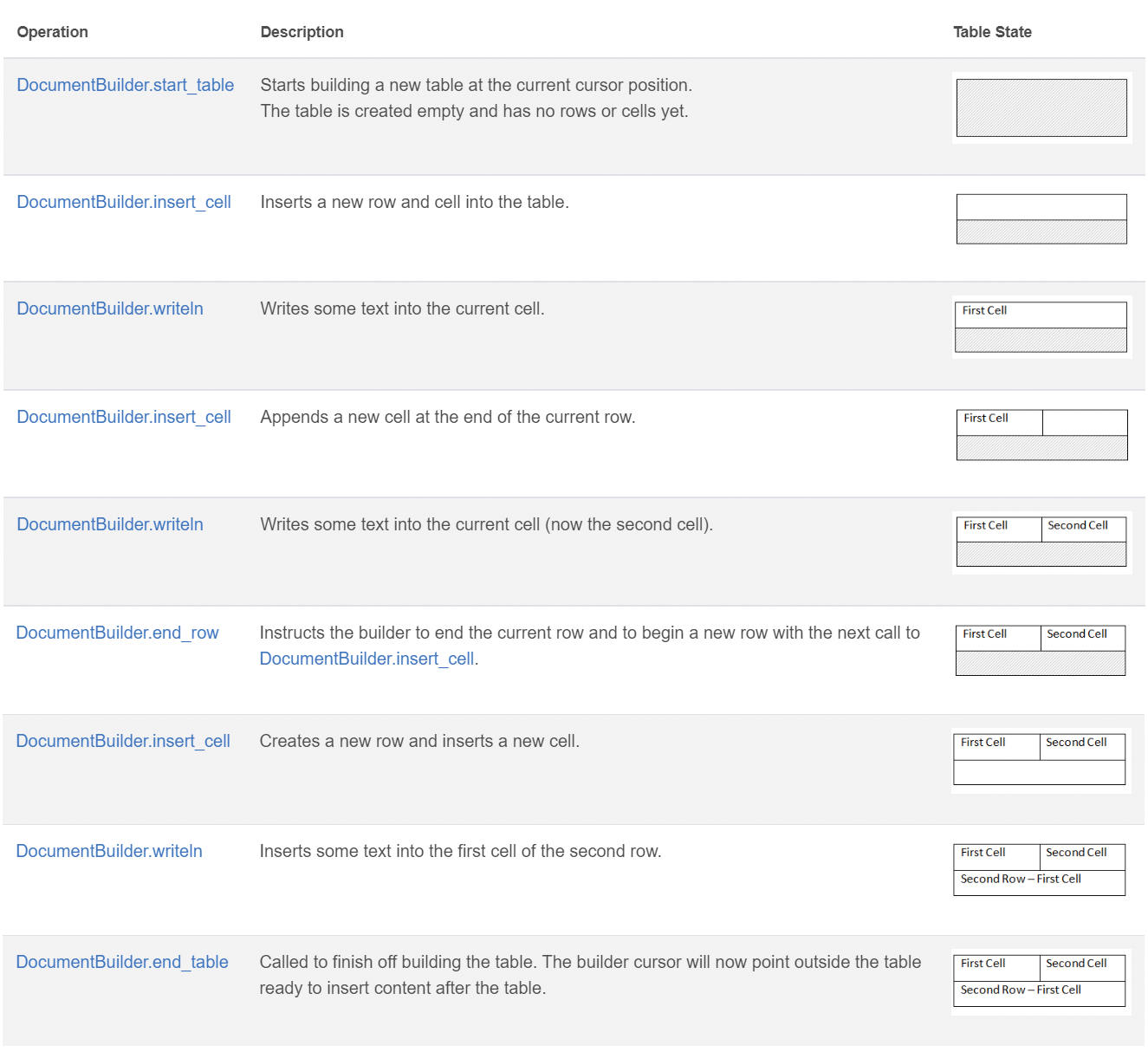
इन 7 चरणों का उपयोग करके Python में तालिका बनाएं:
DocumentBuilder.start_table के साथ तालिका शुरू करें।DocumentBuilder.insert_cell का उपयोग करके तालिका में एक सेल सम्मिलित करें, और DocumentBuilder.cell_format के माध्यम से सेल फ़ॉर्मेटिंग निर्दिष्ट करें।DocumentBuilder का उपयोग करके सेल की सामग्री लिखें।- पंक्ति पूरी होने तक चरण 2 और 3 दोहराएँ।
DocumentBuilder.end_row विधि को कॉल करके पंक्ति समाप्त करें और DocumentBuilder.row_format के साथ पंक्ति फ़ॉर्मेटिंग करें।- तब तक चरण 2‑5 दोहराएँ जब तक पूरी तालिका बन न जाए।
DocumentBuilder.end_table विधि का उपयोग करके तालिका समाप्त करें।
तालिका निर्माण के लिए DocumentBuilder क्लास और विधियों के बारे में अधिक विवरण हमारे दस्तावेज़ीकरण
में दिया गया है।
नीचे आप देख सकते हैं कि कैसे DocumentBuilder का उपयोग करके डिफ़ॉल्ट फ़ॉर्मेटिंग वाली एक सरल तालिका बनाई जाती है।
# For complete examples and data files, please go to https://github.com/aspose-words/Aspose.Words-for-Python-via-.NET
doc = aw.Document()
builder = aw.DocumentBuilder(doc)

# Start building the table.
builder.start_table()
builder.insert_cell()
builder.write("Row 1, Cell 1 Content.")

# Build the second cell.
builder.insert_cell()
builder.write("Row 1, Cell 2 Content.")

# Call the following method to end the row and start a new row.
builder.end_row()

# Build the first cell of the second row.
builder.insert_cell()
builder.write("Row 2, Cell 1 Content")

# Build the second cell.
builder.insert_cell()
builder.write("Row 2, Cell 2 Content.")
builder.end_row()

# Signal that we have finished building the table.
builder.end_table()

doc.save(docs_base.artifacts_dir + "WorkingWithTables.create_simple_table.docx")
DocumentBuilder का उपयोग करके फ़ॉर्मेटेड तालिका बनाने के लिए नीचे दिया गया कोड उदाहरण देखें।
# For complete examples and data files, please go to https://github.com/aspose-words/Aspose.Words-for-Python-via-.NET
doc = aw.Document()
builder = aw.DocumentBuilder(doc)

table = builder.start_table()
builder.insert_cell()

# Table wide formatting must be applied after at least one row is present in the table.
table.left_indent = 20.0

# Set height and define the height rule for the header row.
builder.row_format.height = 40.0
builder.row_format.height_rule = aw.HeightRule.AT_LEAST

builder.cell_format.shading.background_pattern_color = drawing.Color.from_argb(198, 217, 241)
builder.paragraph_format.alignment = aw.ParagraphAlignment.CENTER
builder.font.size = 16
builder.font.name = "Arial"
builder.font.bold = True

builder.cell_format.width = 100.0
builder.write("Header Row,\n Cell 1")

# We don't need to specify this cell's width because it's inherited from the previous cell.
builder.insert_cell()
builder.write("Header Row,\n Cell 2")

builder.insert_cell()
builder.cell_format.width = 200.0
builder.write("Header Row,\n Cell 3")
builder.end_row()

builder.cell_format.shading.background_pattern_color = drawing.Color.white
builder.cell_format.width = 100.0
builder.cell_format.vertical_alignment = aw.tables.CellVerticalAlignment.CENTER

# Reset height and define a different height rule for table body.
builder.row_format.height = 30.0
builder.row_format.height_rule = aw.HeightRule.AUTO
builder.insert_cell()

# Reset font formatting.
builder.font.size = 12
builder.font.bold = False

builder.write("Row 1, Cell 1 Content")
builder.insert_cell()
builder.write("Row 1, Cell 2 Content")

builder.insert_cell()
builder.cell_format.width = 200.0
builder.write("Row 1, Cell 3 Content")
builder.end_row()

builder.insert_cell()
builder.cell_format.width = 100.0
builder.write("Row 2, Cell 1 Content")

builder.insert_cell()
builder.write("Row 2, Cell 2 Content")

builder.insert_cell()
builder.cell_format.width = 200.0
builder.write("Row 2, Cell 3 Content.")
builder.end_row()
builder.end_table()

doc.save(docs_base.artifacts_dir + "WorkingWithTables.formatted_table.docx")
मौजूदा तालिका सम्मिलित करना
यदि आपके दस्तावेज़ में पहले से ही कोई तालिका मौजूद है और आप उसमें एक प्रति जोड़ना चाहते हैं ताकि आप उसमें कुछ परिवर्तन कर सकें, तो तालिका को डुप्लिकेट करने का सबसे आसान तरीका है Table.clone
मेथड का उपयोग करना, जिससे सभी फ़ॉर्मेटिंग बरकरार रहती है।
नीचे दिखाए गए उदाहरण में आप देख सकते हैं कि तालिका कैसे सम्मिलित की जाती है, और यदि आपको इस उदाहरण की टेम्पलेट फ़ाइल चाहिए, तो आप इसे यहाँ
से डाउनलोड कर सकते हैं।
# For complete examples and data files, please go to https://github.com/aspose-words/Aspose.Words-for-Python-via-.NET
doc = aw.Document(docs_base.my_dir + "Tables.docx")

table = doc.get_child(aw.NodeType.TABLE, 0, True).as_table()

# Clone the table and insert it into the document after the original.
tableClone = table.clone(True).as_table()
table.parent_node.insert_after(tableClone, table)

# Insert an empty paragraph between the two tables,
# or else they will be combined into one upon saving this has to do with document validation.
table.parent_node.insert_after(aw.Paragraph(doc), table)

doc.save(docs_base.artifacts_dir + "WorkingWithTables.clone_complete_table.docx")
यदि आपके पास तालिकाओं, Aspose.Words for Python via .NET उत्पादों के बारे में प्रश्न हैं और आप अपने प्रोजेक्ट में हमारे API को लागू करने के लिए हमारे पेड सपोर्ट डेवलपर्स
की मदद चाहते हैं, तो निःसंकोच संपर्क करें
।